vwap_topstepx
VWAP-Based Automated Trading Strategy - Enterprise Production Application
A production-ready VWAP-based automated trading strategy application with REST API backend and React frontend dashboard for TopstepX.
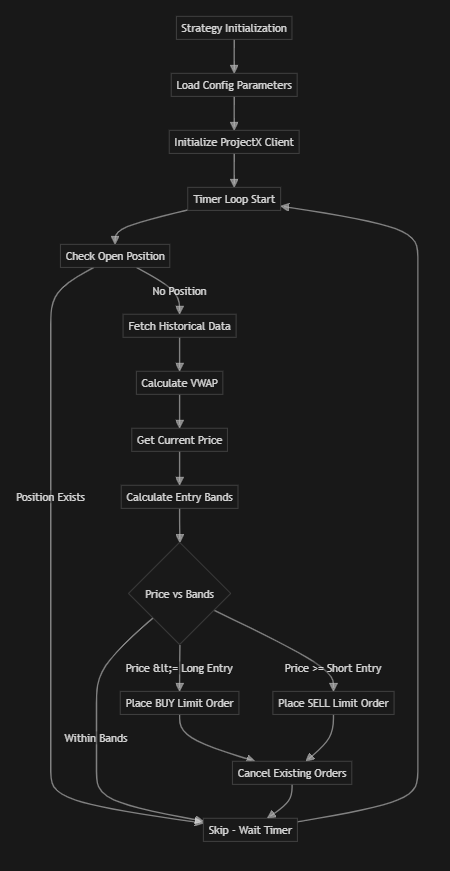
Architecture
This is a full-stack enterprise application with:
- Backend: FastAPI REST API (Python)
- Frontend: React + TypeScript dashboard
- Containerization: Docker & Docker Compose
- Production Ready: Proper error handling, logging, and configuration management
Features
- 🎯 VWAP calculation from historical market data
- 📊 Real-time dashboard for monitoring strategy status
- 🎛️ Web-based controls to start/stop strategy
- 📈 Live VWAP data and entry point visualization
- ⚙️ Configurable parameters via environment variables
- 🐳 Docker containerization for easy deployment
- 🔒 Production-ready security and error handling
Project Structure
vwap_topstepx/
├── backend/                 # FastAPI backend application
│   ├── app/
│   │   ├── api/            # API routes
│   │   ├── core/           # Core configuration
│   │   ├── services/       # Business logic services
│   │   └── main.py         # Application entry point
│   ├── requirements.txt    # Python dependencies
│   └── Dockerfile          # Backend container
├── frontend/               # React frontend application
│   ├── src/
│   │   ├── components/     # React components
│   │   ├── services/       # API client
│   │   └── App.tsx         # Main app component
│   ├── package.json        # Node dependencies
│   └── Dockerfile          # Frontend container
├── docker-compose.yml      # Docker Compose configuration
├── vwap_strategy.py        # Core strategy implementation
├── config.py               # Configuration module
└── README.md               # This file
Prerequisites
- Docker & Docker Compose (recommended for production)
- OR Python 3.11+ and Node.js 18+ for local development
- TopstepX API Access with API credentials
Quick Start with Docker (Recommended)
-
Clone the repository
- Set up environment variables
cp .env.example .envEdit
.envand add your TopstepX credentials:PROJECT_X_API_KEY=your_api_key_here PROJECT_X_USERNAME=your_username_here - Start the application
docker-compose up -d - Access the application
- Frontend Dashboard: http://localhost:3000
- Backend API: http://localhost:8000
- API Documentation: http://localhost:8000/api/docs
Manual Installation
Backend Setup
- Navigate to backend directory
cd backend - Create virtual environment
python -m venv venv source venv/bin/activate # On Windows: venv\Scripts\activate - Install dependencies
pip install -r requirements.txt - Set environment variables
export PROJECT_X_API_KEY=your_api_key_here export PROJECT_X_USERNAME=your_username_here - Run the backend
uvicorn app.main:app --reload --host 0.0.0.0 --port 8000
Frontend Setup
- Navigate to frontend directory
cd frontend - Install dependencies
npm install - Set environment variables (optional)
export VITE_API_URL=http://localhost:8000 - Run the frontend
npm run dev - Access the dashboard
- Open http://localhost:3000 in your browser
Configuration
Configuration is managed through environment variables:
Required Environment Variables
PROJECT_X_API_KEY: TopstepX API keyPROJECT_X_USERNAME: TopstepX username
Optional Configuration
VWAP_DEVIATION: Deviation from VWAP (default: 2.0)TIMER_INTERVAL: Order check interval in seconds (default: 1800 = 30 min)CONTRACT_SIZE: Number of contracts per trade (default: 1)INSTRUMENT: Trading instrument symbol (default: ‘MGC’)DEBUG: Enable debug mode (default: false)HOST: Backend host (default: 0.0.0.0)PORT: Backend port (default: 8000)
API Endpoints
The backend provides the following REST API endpoints:
Status & Health
GET /api/v1/status- Get API statusGET /api/v1/status/health- Health checkGET /health- Root health check
Strategy Control
GET /api/v1/strategy/status- Get strategy statusPOST /api/v1/strategy/control- Start/stop strategy{ "action": "start" // or "stop" }GET /api/v1/strategy/vwap- Get current VWAP dataGET /api/v1/strategy/positions- Get current positions
Configuration
GET /api/v1/config- Get current configuration
API Documentation
Interactive API documentation is available at:
- Swagger UI: http://localhost:8000/api/docs
- ReDoc: http://localhost:8000/api/redoc
Strategy Logic
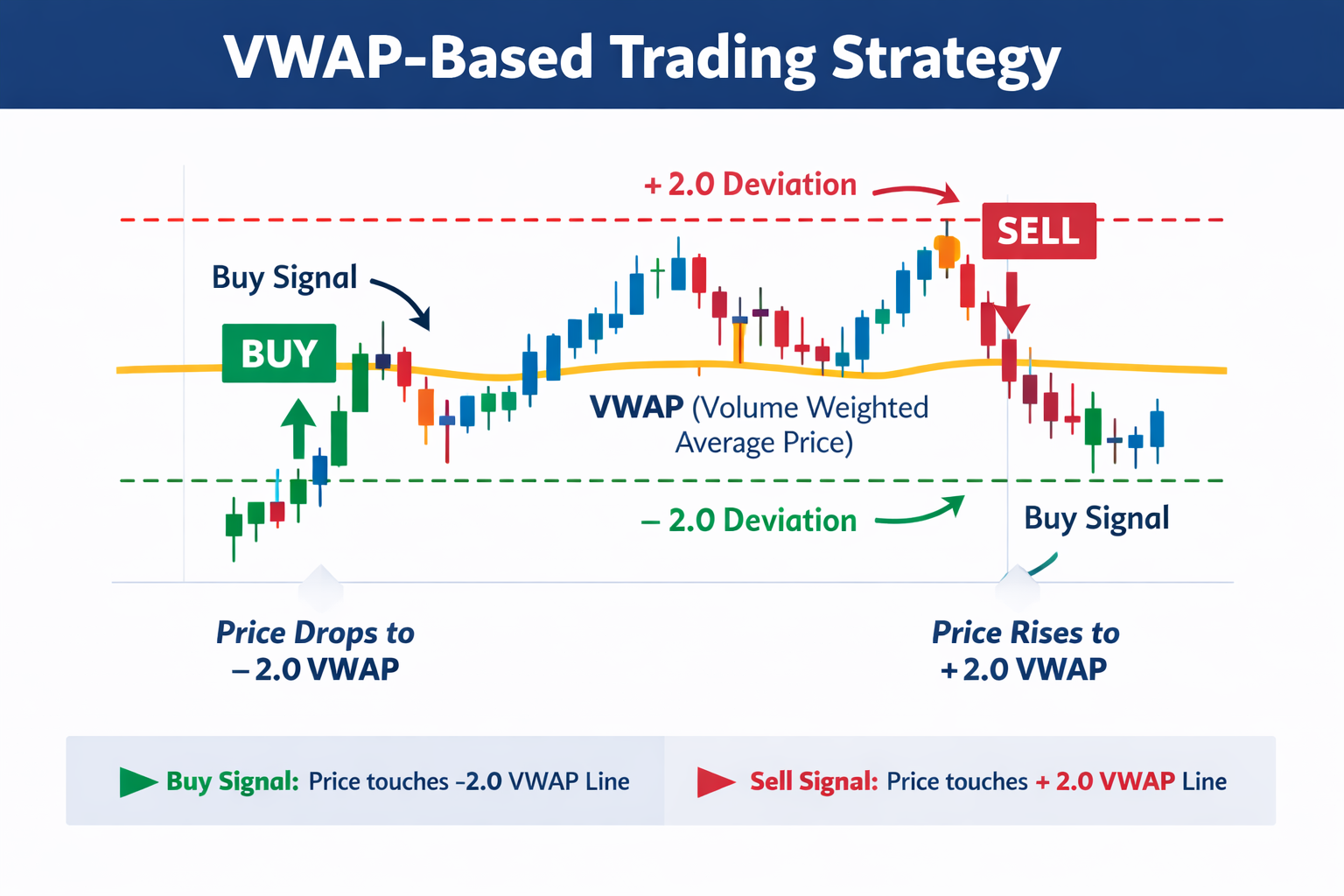
- Long Entry: Place BUY limit order when current price ≤ VWAP - deviation
- Short Entry: Place SELL limit order when current price ≥ VWAP + deviation
- Position Management: Only one trade at a time; skips order placement if position exists
Production Deployment
Docker Deployment
The application is containerized and ready for production deployment:
# Build and start
docker-compose up -d

# View logs
docker-compose logs -f

# Stop services
docker-compose down
Cloud Deployment
The application can be deployed to:
- AWS: ECS, EKS, or EC2
- Google Cloud: Cloud Run, GKE
- Azure: Container Instances, AKS
- DigitalOcean: App Platform, Droplets
Environment Setup for Production
- Set environment variables securely (use secrets management)
- Configure CORS origins in
backend/app/core/config.py - Enable HTTPS/TLS for production
- Set up monitoring and logging
- Configure database for trade history (optional)
Development
Running Tests
# Backend tests (when available)
cd backend
pytest

# Frontend tests (when available)
cd frontend
npm test
Code Structure
- Backend: FastAPI with clean architecture
app/api/- API routes and endpointsapp/services/- Business logicapp/core/- Configuration and shared utilities
- Frontend: React with TypeScript
src/components/- React componentssrc/services/- API client services
Important Notes
⚠️ Production Considerations
- Test thoroughly in a simulated/paper trading environment before live trading
- Ensure compliance with Topstep’s terms of use
- Implement proper risk management and monitoring
- Use secure secrets management for API credentials
- Monitor the application and implement alerting
- API method names may need adjustment based on actual
project-x-pydocumentation
License
This is an enterprise production application for trading purposes.